
Google Ads Quality Score is a 1–10 rating that measures the relevance and quality of your keywords, ads, and landing pages. To improve it, focus on these three core pillars that Google evaluates: Expected Click-Through Rate (CTR), Ad Relevance, and Landing Page Experience. Practical steps include writing tightly themed ad groups, matching your ad copy to user search intent, speeding up your landing page, using negative keywords, leveraging ad extensions, and running regular A/B tests. A higher Quality Score directly lowers your cost-per-click (CPC) and improves your ad placement — meaning you pay less and appear more prominently.
INTRODUCTION
Imagine paying 50% less per click while your ads appear at the very top of Google Search. That’s not a dream — that’s what a high Google Ads Quality Score can do for your campaigns.
Every time your ad enters an auction, Google evaluates it against a Quality Score — a 1 to 10 diagnostic metric that reflects how relevant your ad, keywords, and landing page are to the user’s search. According to WordStream, advertisers with a Quality Score of 6 or higher enjoy a 16–50% decrease in cost-per-click (CPC), while those scoring below 4 can see their CPC skyrocket by 25–400%. That’s a massive swing in advertising efficiency.
Whether you’re a small business owner running your first campaign or a seasoned PPC manager overseeing enterprise accounts, improving your Quality Score should be a top priority. In this article, you’ll learn 10 proven, practical ways to improve your Google Ads Quality Score, reduce wasted ad spend, and drive better ROI — backed by real data and expert-level strategy.
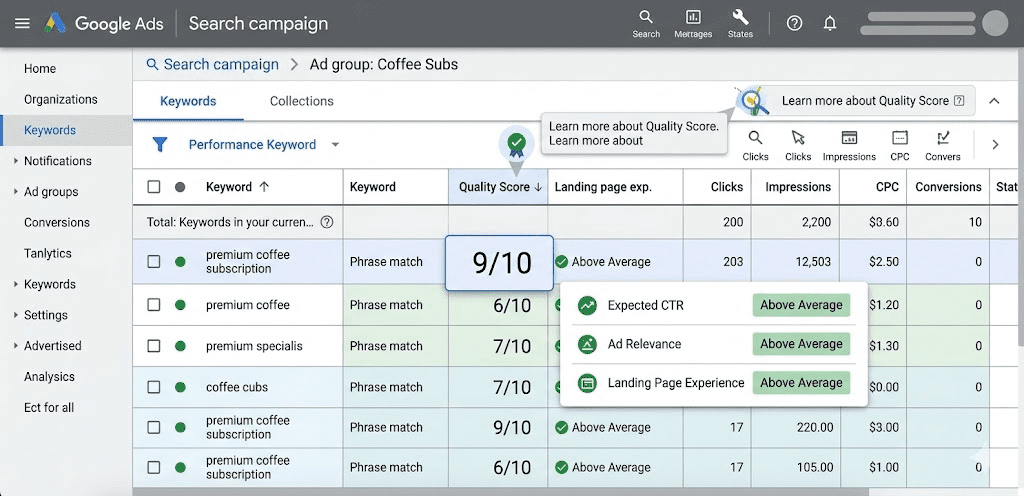
What Is Google Ads Quality Score? (Full Explanation)
Google Ads Quality Score is a diagnostic score from 1 to 10 assigned at the keyword level. It reflects how relevant and useful your ad experience is compared to other advertisers competing for the same keywords. Google does not use the Quality Score number directly in live auctions, but the underlying components — Expected CTR, Ad Relevance, and Landing Page Experience — are factored into every ad auction in real time.
Here’s how the three components break down:
- Expected Click-Through Rate (CTR): Google predicts how likely a user is to click your ad when they search for your keyword. This is based on historical data from similar ads and auctions.
- Ad Relevance: How closely your ad copy matches the search intent behind the keyword. Google evaluates whether your ad makes sense for the user’s query.
- Landing Page Experience: How useful, relevant, fast, and user-friendly your landing page is after someone clicks your ad.
Each component is rated as “Above Average,” “Average,” or “Below Average.” The combination of these three ratings produces your final 1–10 score.
Why does it matter? Because Quality Score directly influences your Ad Rank — the formula Google uses to decide where your ad appears and how much you pay per click. A higher score means better position at a lower cost. A score of 7–10 is considered excellent, 5–6 is average, and anything below 4 signals serious optimization is needed.
How Does Google Ads Quality Score Work? (Step-by-Step)
Understanding the mechanics of Quality Score is the first step to improving it. Here’s how the process works from search query to ad display:
- A user types a query into Google Search — for example, “best running shoes for beginners.”
- Google identifies eligible ads based on keyword targeting, bid levels, and campaign settings.
- Google runs an auction and evaluates each ad’s Expected CTR, Ad Relevance, and Landing Page Experience in real time.
- Ad Rank is calculated using the formula:
Ad Rank = Bid × Quality Score components + Ad Extensions impact + Auction-time signals. - The ad with the highest Ad Rank wins the best position. Note: a lower bid with a higher Quality Score can outrank a higher bid with a low Quality Score.
- The final CPC is determined — higher Quality Scores result in lower actual costs per click.
This system rewards advertisers who create genuinely useful ad experiences. Google wants users to find what they’re looking for quickly, and it incentivizes advertisers who help make that happen.
10 Practical Ways to Improve Your Google Ads Quality Score
Way #1: Tighten Your Ad Group Structure (SKAGs or Themed Groups)
One of the most impactful changes you can make is restructuring your ad groups. Many advertisers stuff dozens of unrelated keywords into a single ad group, which makes it nearly impossible to write ad copy that’s relevant to all of them.
The best practice is to use Single Keyword Ad Groups (SKAGs) or tightly themed ad groups with 3–5 closely related keywords. This allows you to write laser-focused ad copy that directly reflects the exact keyword a user searched for.
For example, instead of one ad group containing “running shoes,” “best sneakers,” and “athletic footwear,” create separate groups for each theme. Your ad for “best running shoes for beginners” can then say exactly that — making it far more relevant and improving both your Ad Relevance and Expected CTR scores.
Way #2: Write Ad Copy That Perfectly Matches Search Intent
Your ad relevance score lives and dies by how well your copy mirrors what users are actually searching for. There are four main types of search intent: informational, navigational, commercial, and transactional. Each demands a different approach.
- For transactional intent (e.g., “buy protein powder online”), use action-oriented copy: “Order Premium Protein Powder — Free Shipping Today.”
- For commercial intent (e.g., “best CRM software”), use comparative copy: “Top-Rated CRM Software — See Why 10,000+ Businesses Choose Us.”
Always include your focus keyword in the headline of your ad. Google bolds the keyword when it matches the search query, which visually signals relevance to the user and increases CTR. Also use Responsive Search Ads (RSAs) and pin your most relevant headlines to Positions 1 and 2 for consistent messaging.
Way #3: Optimize Your Landing Page Experience
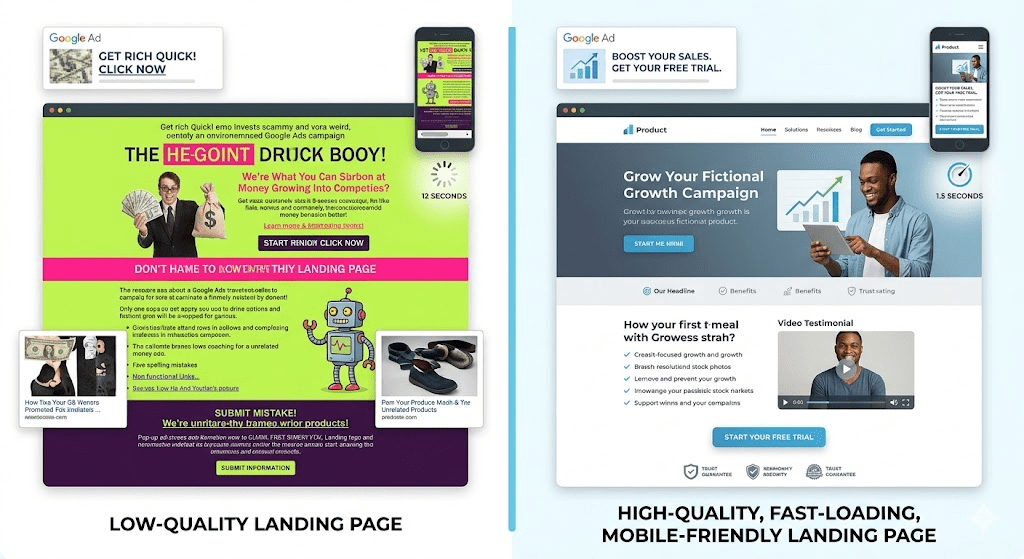
Your landing page is where the Quality Score rubber meets the road. Google evaluates several factors including page relevance, content quality, mobile-friendliness, page load speed, and navigability. A landing page that takes 5 seconds to load or sends users to a generic homepage instead of a product-specific page will tank your score.
Follow these landing page best practices:
- Match the message: If your ad says “50% Off Summer Dresses,” your landing page should feature exactly that promotion — not a general clothing catalog.
- Speed it up: Use Google’s PageSpeed Insights tool to target a load time of under 3 seconds. Compress images, enable browser caching, and minimize JavaScript.
- Mobile-first design: Over 60% of Google Ads clicks come from mobile devices (Source: MarketingLTB, 2025). If your landing page isn’t mobile-optimized, you’re losing both users and Quality Score points.
- Clear Call-to-Action (CTA): Every landing page needs one obvious next step — “Buy Now,” “Get a Free Quote,” or “Start Your Free Trial.”
- Relevant, original content: Avoid thin or duplicated content. Include the keyword naturally in your page headline and body copy.
Way #4: Boost Your Expected Click-Through Rate (CTR)
Expected CTR is one of the most heavily weighted components of Quality Score. Google estimates this based on your ad’s historical performance relative to others targeting the same keyword. Here’s how to drive it higher:
- Use numbers and specifics: “Save 37% on Cloud Hosting” outperforms “Save Big on Cloud Hosting” because specificity creates credibility and curiosity.
- Add urgency: Phrases like “Limited Time,” “Ends Sunday,” or “Only 12 Left” prompt faster action.
- Ask a question: “Looking for Affordable SEO Tools?” directly engages users who are in that mindset.
- Include the keyword in Display URL paths: For example,
yoursite.com/running-shoesin the ad display URL reinforces relevance. - Use emotional triggers: Words like “exclusive,” “proven,” “guaranteed,” and “free” consistently improve CTR across industries.
Way #5: Use Negative Keywords Strategically
Negative keywords are one of the most underutilized Quality Score tools. When your ad appears for irrelevant searches, it gets impressions but no clicks — which drags down your Expected CTR and signals poor relevance to Google.
For example, if you’re selling premium accounting software and your ad appears for the search “free accounting software,” users who are looking for a free product won’t click your paid ad. That wasted impression hurts your CTR ratio.
Regularly review your Search Terms Report in Google Ads to identify queries that are triggering your ads but not converting. Add these as negative keywords at the campaign or ad group level. Common negative keyword categories include “free,” “DIY,” “jobs,” “how to,” and competitor brand names (unless you’re running intentional competitor campaigns).
Way #6: Leverage Ad Extensions (Now Called Assets)
Ad extensions — rebranded as “Assets” in Google Ads — do not directly calculate into your Quality Score formula, but they significantly increase your Expected CTR, which does. Extensions give your ad more real estate on the search results page and provide users with additional reasons to click.
Key assets to implement include:
- Sitelink Extensions: Link to specific pages like “Pricing,” “Reviews,” or “Free Trial.”
- Callout Extensions: Highlight unique selling points like “No Contract,” “24/7 Support,” or “Award-Winning Service.”
- Structured Snippets: List specific features or services (e.g., “Types: Marketing, Analytics, CRM”).
- Call Extensions: Display your phone number for immediate contact.
- Price Extensions: Show product or service pricing upfront to qualify leads.
According to MarketingLTB (2025), ad extensions increase CTR by 10–15% on average. Implementing all relevant extensions is a quick win that every advertiser should prioritize.
Way #7: Conduct Regular A/B Testing on Ad Variants
You cannot improve what you don’t test. Google Ads rewards advertisers who continuously refine their ads based on performance data. A/B testing (or split testing) involves running two or more versions of an ad simultaneously and measuring which performs better.
Test one variable at a time for clean, actionable results:
- Headline variations: “Get Started Free” vs. “Try It Free for 30 Days”
- CTA changes: “Shop Now” vs. “Claim Your Deal”
- Value propositions: Emphasizing price in one ad, quality in another
- Description copy: Longer benefit-focused copy vs. short punchy statements
Use Google Ads Experiments (under the Campaigns menu) to run statistically valid tests. Once a winner emerges, pause the underperforming variant and use the winner as your new control. Then test again. This cycle of iterative improvement consistently raises CTR and Ad Relevance over time.
Way #8: Align Keywords with Match Types Intelligently
Keyword match types control which search queries trigger your ads. Using overly broad match types without guardrails results in irrelevant impressions, low CTR, and poor Quality Scores.
- Broad Match casts the widest net but requires robust negative keyword lists to avoid wasted spend.
- Phrase Match triggers ads for queries that include your keyword phrase in order — a solid balance of reach and control.
- Exact Match triggers ads only for that specific query, giving you maximum control and typically the highest relevance scores.
The best strategy is a tiered approach: use Exact Match for your highest-converting, most relevant keywords, Phrase Match for secondary terms, and Broad Match only with Smart Bidding strategies and aggressive negative keyword management.
Way #9: Improve Mobile Performance Across All Touchpoints
With over 60% of Google Ads clicks coming from mobile devices, ignoring the mobile experience is a costly mistake. Google evaluates mobile landing page experience as part of your Quality Score. A poor mobile experience means lower scores, fewer conversions, and higher CPCs.
Mobile optimization checklist:
- Ensure your site uses responsive design that adapts to all screen sizes.
- Target a mobile page load time of under 2 seconds — Google research shows 53% of mobile users abandon pages that take longer than 3 seconds.
- Use large, tappable buttons for CTAs — minimum 48×48 pixels.
- Avoid intrusive pop-ups on mobile landing pages, as Google penalizes these.
- Test your mobile experience using Google’s Mobile-Friendly Test tool.
Additionally, consider creating mobile-specific ad copy with shorter headlines and CTAs that work within mobile’s smaller screen context. Mobile users often have different intent — they may prefer calling over filling out a form, making Call Extensions especially valuable for this audience.
Way #10: Monitor, Analyze, and Iterate Consistently
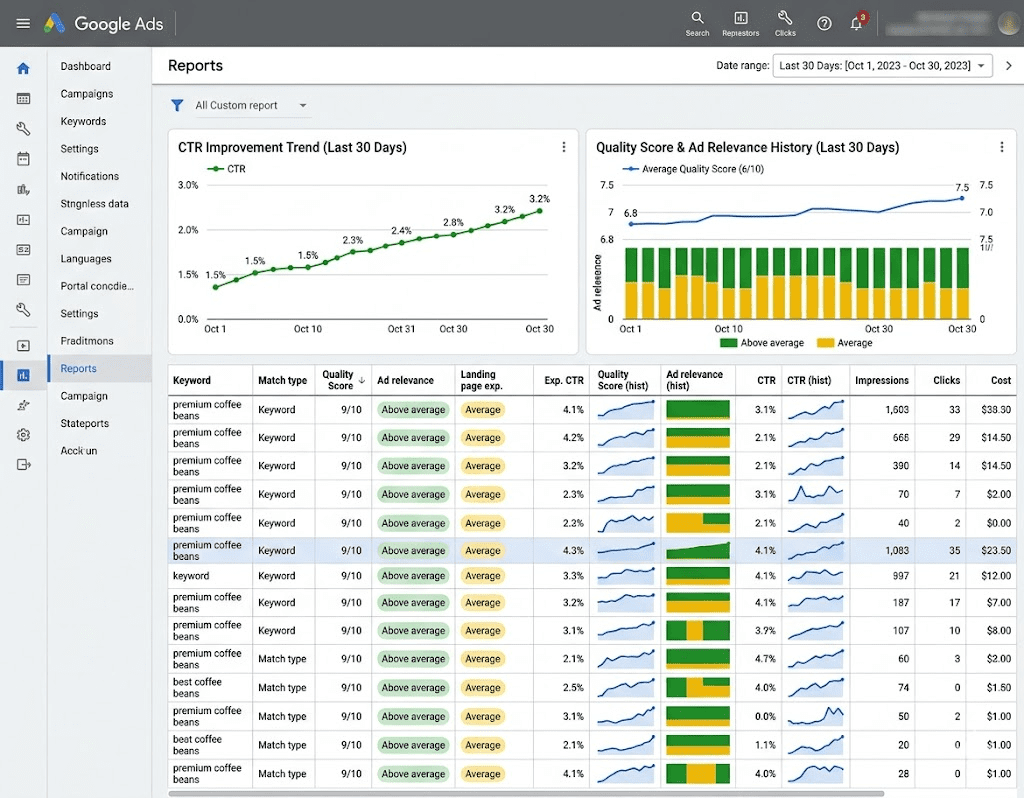
Improving your Google Ads Quality Score is not a one-time event — it’s an ongoing process. The advertisers who achieve and maintain high scores are those who consistently monitor their campaign data and make data-driven adjustments.
Build these habits into your weekly and monthly workflow:
- Review Quality Score columns weekly: Add Quality Score (hist.), Landing Page Experience (hist.), Expected CTR (hist.), and Ad Relevance (hist.) to your keyword reports to track trends over time.
- Check the Search Terms Report: Identify new negative keyword opportunities and discover new high-intent keywords to target.
- Monitor landing page performance: Track bounce rate, time on page, and conversion rate in Google Analytics 4 to identify underperforming pages.
- Review Auction Insights: Understand who you’re competing against and how your impression share compares.
- Use the Google Ads Recommendations tab: While not every suggestion should be blindly applied, the tab can surface optimization opportunities you may have missed.
Benefits of a High Google Ads Quality Score
Improving your Quality Score creates a powerful positive feedback loop across your entire campaign. Here are the most significant benefits:
- Lower Cost-Per-Click (CPC): Advertisers with a Quality Score of 6 or higher receive a 16–50% decrease in CPC, according to WordStream data. A lower CPC means your budget stretches further and generates more clicks for the same spend.
- Better Ad Positions: Higher Quality Scores improve your Ad Rank, meaning your ad appears in more prominent positions without requiring you to simply outbid competitors.
- Higher Impression Share: When your ads are deemed more relevant, Google serves them more frequently, increasing your visibility across the auction.
- Improved ROI: Lower costs combined with more qualified clicks (since high relevance attracts the right users) leads to dramatically better return on investment.
- Competitive Advantage: A high Quality Score lets smaller advertisers compete effectively against brands with much larger budgets — it’s the great equalizer of Google Ads.
- Better User Experience: Higher scores mean users are finding ads that genuinely match what they’re looking for — which benefits both the advertiser and the customer.
- Reduced Wasted Spend: Better keyword targeting and negative keyword use eliminates budget drain from irrelevant clicks.
Common Mistakes That Hurt Your Google Ads Quality Score
Even experienced advertisers make these critical errors that quietly destroy Quality Scores:
- Sending all traffic to the homepage instead of dedicated, offer-specific landing pages.
- Mixing unrelated keywords into one ad group, making it impossible to write truly relevant ad copy.
- Ignoring negative keywords, causing ads to appear for irrelevant queries and dragging down CTR.
- Setting up campaigns and never revisiting them — “set it and forget it” is the enemy of Quality Score improvement.
- Slow landing pages — even a 1-second delay in page load can reduce conversions by 7% (Google).
- Writing generic, feature-focused ad copy instead of benefit-driven copy aligned with search intent.
- Not using ad extensions — leaving easy CTR gains on the table.
- Pausing and restarting ads too frequently, which resets historical CTR data and can temporarily reduce your expected CTR score.
Quality Score vs. Ad Rank — Key Comparison
Understanding how Quality Score differs from Ad Rank helps clarify what to optimize and why. Here’s a clear comparison:
| Feature | Quality Score | Ad Rank |
|---|---|---|
| Scale | 1 to 10 (diagnostic) | Variable (calculated per auction) |
| Purpose | Diagnostic health indicator | Determines ad position and CPC |
| Components | Expected CTR, Ad Relevance, Landing Page Experience | Quality Score components + Max CPC Bid + Ad Extensions + Auction-time signals |
| When Calculated | Updated periodically as a diagnostic tool | Recalculated in real time for every single auction |
| Who Sees It | Advertisers (in the Keywords tab) | Not directly visible to advertisers |
| Direct Impact | Guides optimization decisions | Directly determines position and cost |
The key takeaway: Quality Score is your report card. Ad Rank is your final grade. You improve the report card (Quality Score) to achieve better final grades (Ad Rank outcomes) in every auction.
IMPORTANT FACTS & STATISTICS
The data behind Google Ads Quality Score makes a compelling case for why optimization is non-negotiable:
1. Quality Score has a massive impact on CPC. According to WordStream, advertisers with a Quality Score of 6 or higher enjoy a 16–50% reduction in CPC, while those with a score of 4 or below see CPC increase by 25–400%. This can represent thousands of dollars in monthly ad spend differences.
2. Google Ads reaches 90% of internet users worldwide. With such massive reach, according to MarketingLTB (2025), the competition for top ad positions is fierce. Quality Score optimization is one of the clearest paths to winning those positions without simply spending more.
3. Ad extensions increase CTR by 10–15%. Data from MarketingLTB (2025) confirms that using ad assets/extensions consistently lifts click-through rates, directly benefiting the Expected CTR component of Quality Score.
4. Mobile landing pages optimized for speed can double conversion rates. According to Google’s own research (cited by MarketingLTB, 2025), fast, mobile-friendly landing pages have a dramatic impact on user behavior — which flows directly into the Landing Page Experience component of Quality Score.
5. Negative keywords reduce wasted spend by 25%. As reported by MarketingLTB (2025), strategic use of negative keywords is one of the highest-ROI optimizations available, improving both budget efficiency and Quality Score by eliminating irrelevant impressions that drag down Expected CTR.
FAQ SECTION (People Also Ask)
Q1: What is a good Google Ads Quality Score?
A good Quality Score is generally 7 or higher out of 10. Scores of 8–10 are considered excellent and typically indicate highly relevant ads, strong Expected CTR, and great landing page experiences. A score of 5–6 is average and competitive, while anything below 4 is a red flag indicating significant optimization is needed. Keep in mind that ideal scores can vary by industry — brand keywords often achieve 9–10, while more competitive generic keywords may max out at 7–8.
Q2: How long does it take to improve Google Ads Quality Score?
Quality Score can begin to improve within a few days to a few weeks after implementing optimizations, but meaningful changes typically take 2–4 weeks to reflect in your reported scores. This is because Google needs time to accumulate new data on CTR performance from your updated ad copy and landing pages. Landing page changes can be detected faster, while Expected CTR improvements depend on gathering statistically significant click data across enough auctions.
Q3: Does Quality Score directly affect my ad’s position in search results?
Not directly — but it heavily influences Ad Rank, which does determine ad position. Ad Rank is calculated using Quality Score components (Expected CTR, Ad Relevance, Landing Page Experience) combined with your maximum bid, auction-time signals, and the impact of ad extensions. A higher Quality Score allows you to achieve a better Ad Rank than competitors even if your bid is lower, which is one of the core competitive advantages of optimizing your Quality Score.
Q4: Can I have a high Quality Score with a low bid?
Yes, absolutely. Quality Score and your bid are independent variables in the Ad Rank formula. A low bid combined with an excellent Quality Score (9–10) can still outperform a high bid with a poor Quality Score (3–4). This is Google’s way of rewarding relevance over financial power. It means that smaller businesses with well-optimized, highly relevant campaigns can compete effectively against larger advertisers with bigger budgets but less disciplined ad strategies.
Q5: Should I pause keywords with low Quality Scores or try to fix them?
It depends on the keyword’s business value and volume. For high-value, high-intent keywords with low scores, invest time in optimization — improve ad copy relevance, create a dedicated landing page, and tighten up the ad group theme. For low-volume, low-value keywords with poor scores, pausing them is often the better choice since they drag down your overall account health. As a general rule: fix what’s worth fixing, pause what’s not. Use the Search Terms Report to identify which keywords are actually driving conversions before making that decision.
CONCLUSION
Improving your Google Ads Quality Score is one of the highest-leverage actions you can take in digital advertising. It doesn’t require a bigger budget — it requires smarter strategy. By tightening your ad group structure, writing intent-matched ad copy, optimizing your landing pages for speed and relevance, using negative keywords, and consistently A/B testing your campaigns, you create a compounding cycle of improvement that lowers your costs and elevates your results simultaneously.
Remember: a Quality Score of 7 or higher can reduce your CPC by up to 50%, while a score below 4 can nearly quadruple what you pay per click. That’s the difference between a campaign that bleeds budget and one that delivers real, measurable ROI.
Start with one or two of the ten strategies covered in this guide, measure the impact, then layer in the next. Consistency is everything.
Found this guide helpful? Drop your biggest Google Ads challenge in the comments below — we’d love to help you crack it. And if you found value here, share this article with a fellow marketer who’s struggling with their ad performance. The best campaigns are built on shared knowledge.